How to Restart Docker
In this article, you will learn how to restart the Docker daemon and Docker containers using the CLI.
For this guide, we'll use a BlueVPS NVMe-bKVM server with 4 GB of RAM.
We assume that you run all commands as the root user.
Should you restart the Docker daemon or a Docker container?
Restart the Docker daemon when you have updated the Docker Engine or system kernel; the Docker CLI isn't responding (frozen), you changed /etc/docker/daemon.json settings (e. g., storage drivers, log drivers or custom registries).
Restart a Docker container when an app inside the container has frozen/lagged/crashed; you changed an app config file or mounted volume files for the container.
Restart the Docker Daemon
To restart Docker, simply run the following command:
systemctl restart docker
Please note that systemctl restart docker will restart all your running containers by default. You can verify it using this command:
docker info | grep "Live Restore"
But if the output shows Live Restore Enabled: true which is not a default setting, your containers will stay alive.
Use this command to enable live restore (containers will stay alive if the daemon restarts):
tee /etc/docker/daemon.json <<EOF
{
 "live-restore": true
}
EOF
systemctl reload docker
Use this command to disable live restore (containers will restart if the daemon restarts):
tee /etc/docker/daemon.json <<EOF
{
 "live-restore": false
}
EOF
systemctl reload docker
Restart a Docker container
Before restarting a container you should identify its name or ID. Run the following command to list your containers:
docker ps

Here we can see 3 of our containers, we can restart them by using CONTAINER ID or NAMES.
For example, let's restart httpd by its name and then by its container ID:
docker restart httpd
docker restart 997f9dd62538
From the status we can see that the container was restarted and has been running for one second now

Restart a container automatically
Docker has restart policies for containers on exit or when Docker restarts so you avoid using process managers to start containers.
There are four restart policies:
no - Don't restart the container.
on-failure[:max-retries] - Restart the container on failure, you can limit the number of restart attempts.
always - Always restart the container when it stops.
unless-stopped- Always restart the container if it stops, unless you stopped it manually.
Here are command examples for all four restart policies:
docker run -d --restart=no httpd
docker run -d --restart=on-failure:3 httpd
docker run -d --restart=always httpd
docker run -d --restart=unless-stopped httpd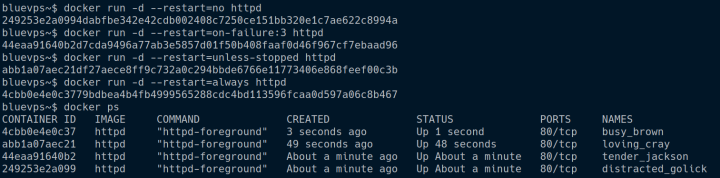
Conclusion
Knowing when and how to restart Docker containers can save time and prevent unnecessary downtime:
- Use systemctl restart docker for core updates and configuration changes.
- Use docker restart <name/ID> to quickly recover a specific unresponsive application.
- Set appropriate restart policies (--restart) during deployment to automate container recovery.
Don't forget to check out our VPS servers for the best prices on the market!
Blog